Threshold Review: BeyondATC
March 2, 2026
Before I start this review, I just wanted to send my thanks to the BeyondATC team for kindly providing this product for free to allow me to review it. Nevertheless, my opinions in this review remain honest, and hopefully once you read this review, you can make an informed decision on whether or not this is the right product for you. Lastly, I wanted to mention that although this product works in both MSFS 2020 and MSFS 2024, this review will be solely done in MSFS 2024.
What is BeyondATC?
BeyondATC is an air traffic control (ATC) plugin for MSFS 2020 and 2024 that provides artificial ATC into the simulator, allowing you to fly offline and without tools such as VATSIM, while having a realistic ATC experience. The addon features over 100 different and realistic AI voices that use realistic phraseology and have regional accents. One thing that sets BeyondATC apart from other AI ATC addons, is it is a one time purchase. The basic package of BeyondATC is $29.99 (USD), which provides full access to the addon, and all future updates. It also provides unlimited push to talk uses, 100+ good quality voices, and 250+ high quality premium voices. Users can also purchase the BeyondATC supporter pack for $59.99. This version does not come with any extra major features, except you will have access to the development branch, and other minor features.
Installation
Installing BeyondATC was just like installing any other program, simply download the installer, run it, choose an installation path, and it did the rest for you. Unfortunately, I did have an issue of the launcher not running, and when checking the Windows event viewer, it showed the application crashing every time. After doing some research I realized the BeyondATC team provided a way to run the application in DirectX11, DirectX12, and OpenGL. Once I ran the application in DirectX12, it opened correctly and worked fine. This was not a major issue, but just something that took some troubleshooting to get correct. If you have the same problem of the application not launching, this is something to try. Lastly, the developer also provided an in-game toolbar for the application, which is simply a drag and drop into the community folder. Besides the issues I had with starting the main application, there is not much to note about the installation that would make it harder or easier than any other addons, it is simply an .exe file that you install, or with the in-game toolbar, an addon that you drag and drop into the community folder.
Pre-Flight UI
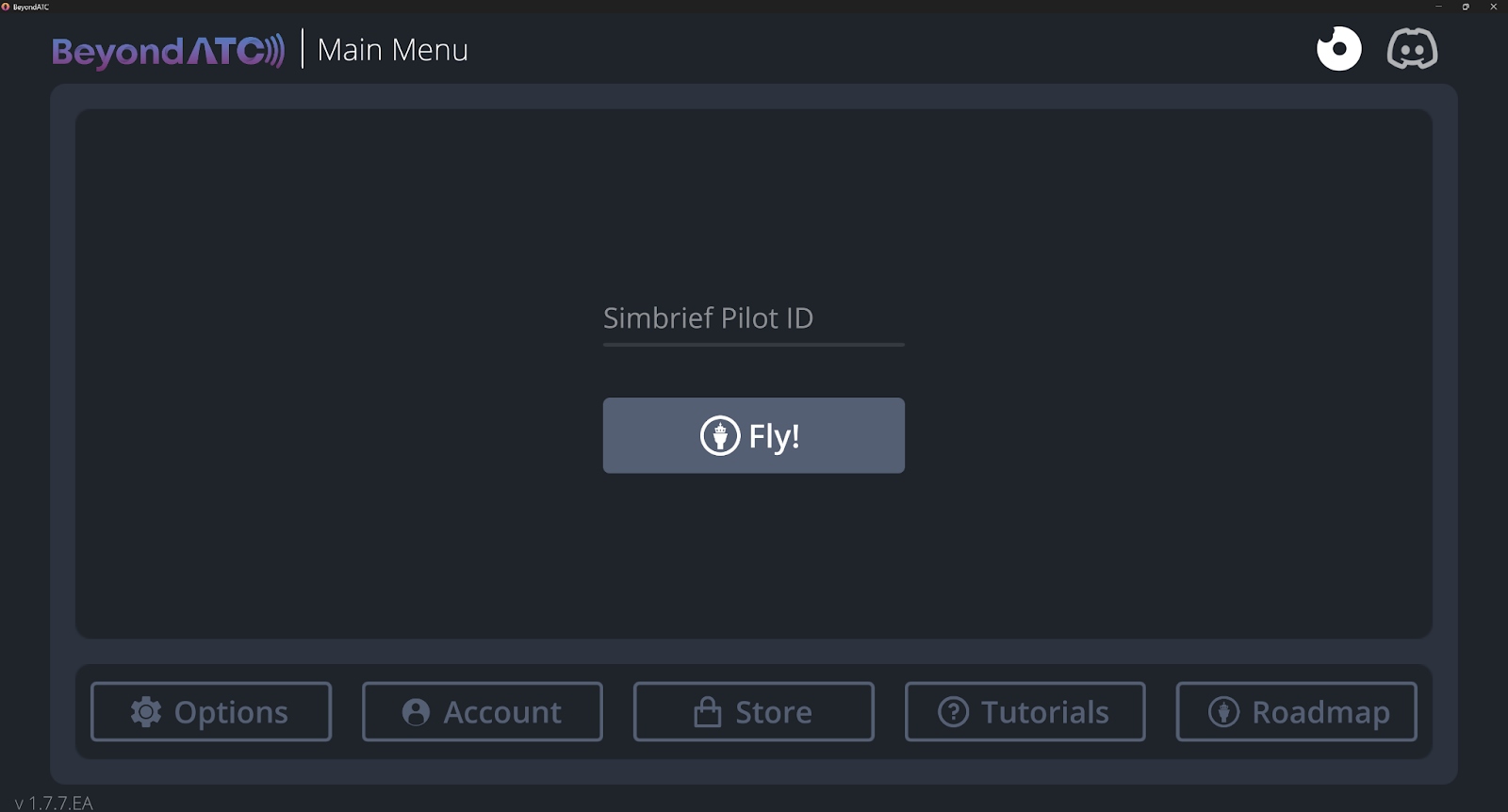
Before diving into the air traffic control (ATC) aspect of BeyondATC, I wanted to briefly talk about the UI of the application before you commence your flight. Once you open the application and go through the beginning steps (making an account, testing your microphone, purchasing the product, etc.), you are met with the main page asking for your SimBrief pilot ID, and a button that says “Fly!” which allows you to start the flight using your SimBrief flight plan.
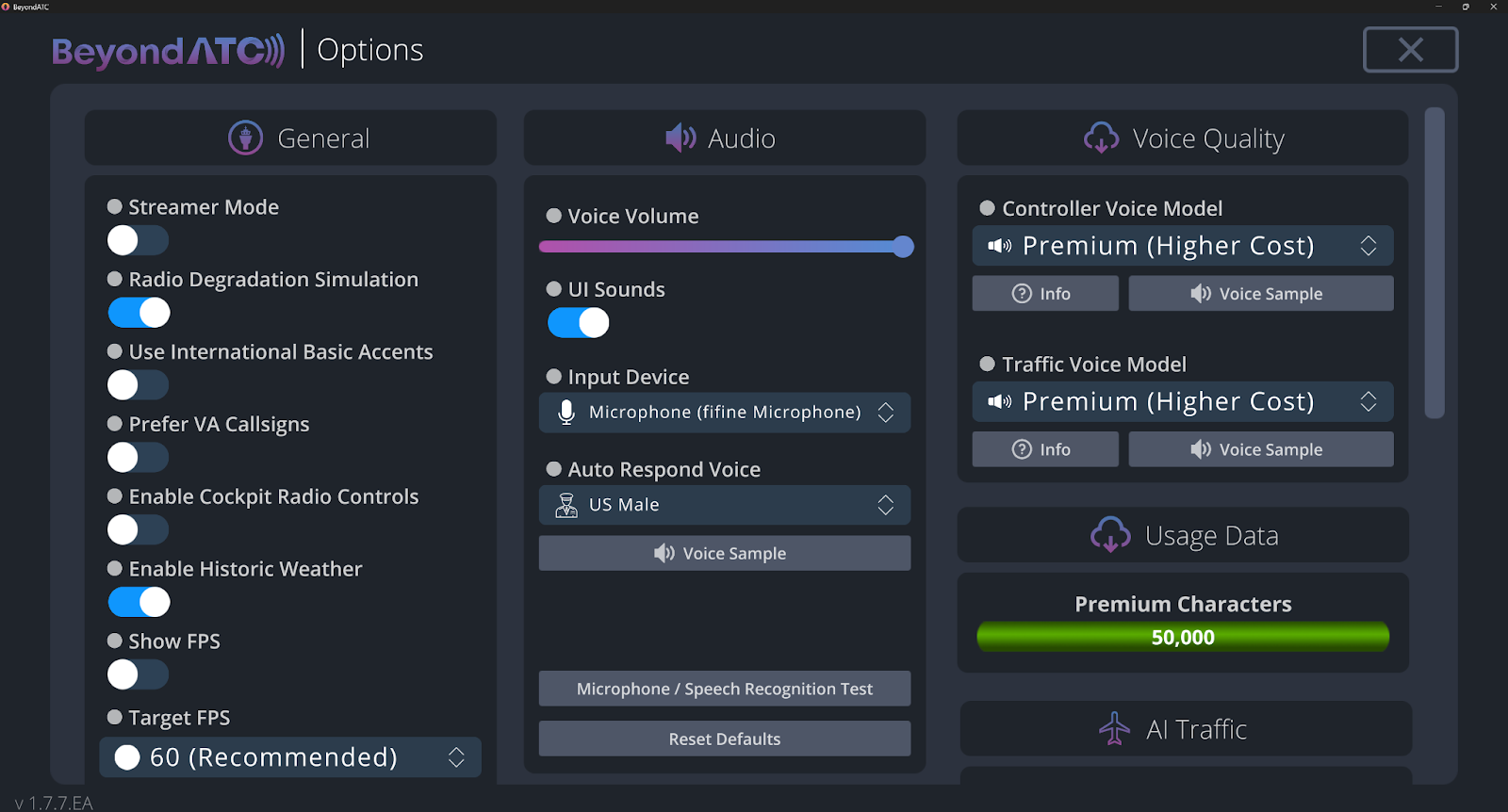
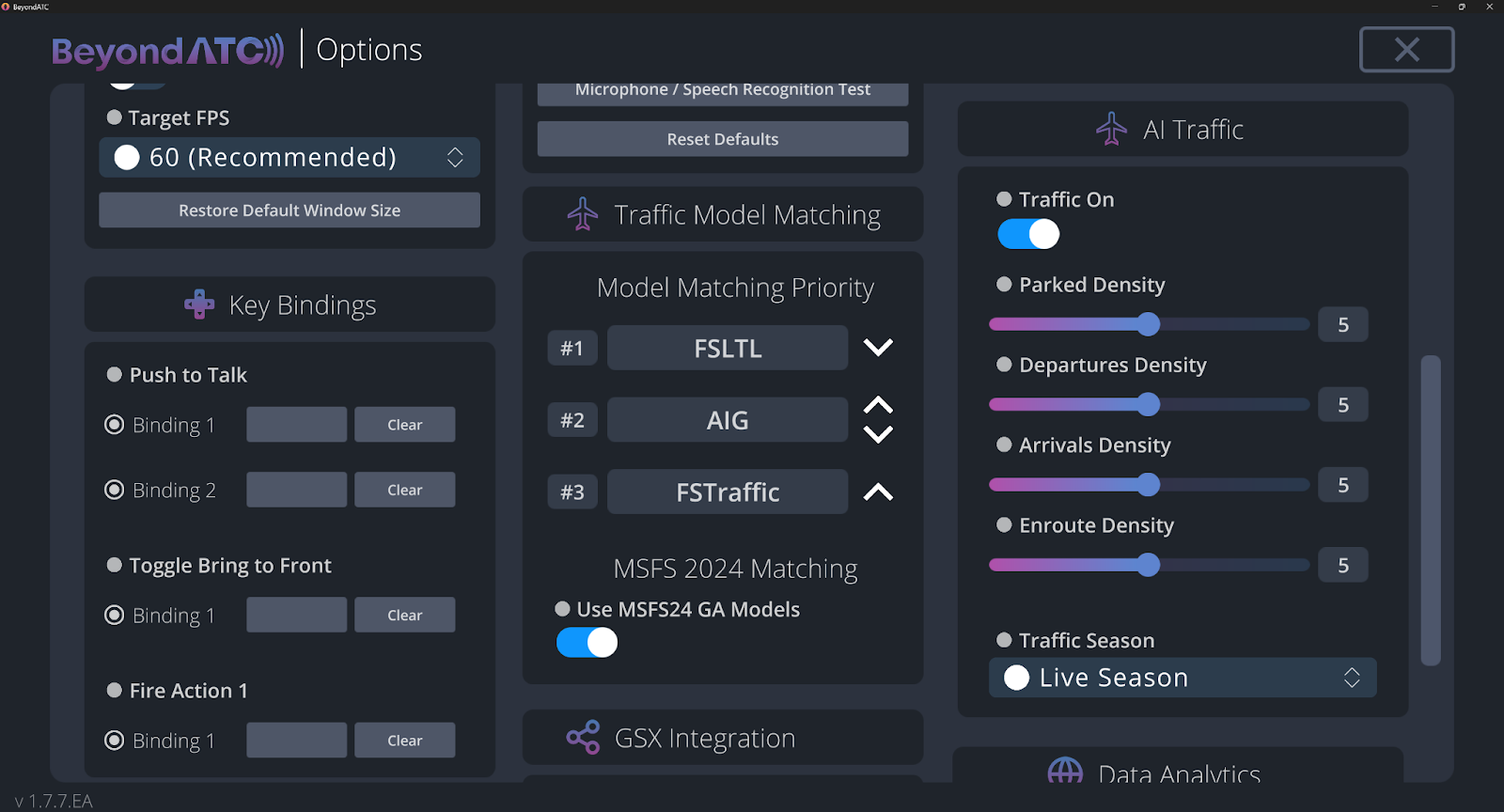
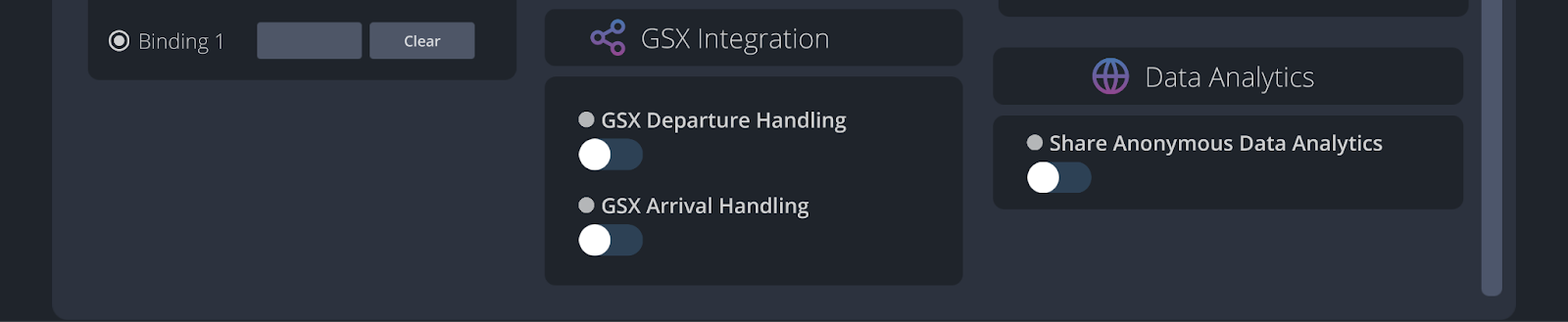
As can be seen in the screenshots above, the settings provide a lot of customization, including general options, audio, voice quality, key bindings, model matching, AI traffic, GSX integration, and data analytics. I appreciate the level of customization we have here, including being able to enable streamer mode, change model matching, edit traffic settings, GSX integration, and more.
For the rest of the application, there is not much more that requires any in-depth review, the remaining options include the Account page (where you can log out, change your password, etc), the store page (where you can purchase BeyondATC and additional premium voices), the tutorials page(which provides some helpful tutorials to aid in using the product), and lastly, the roadmap page, where users can view the current progress of BeyondATC as an early access product.
In-Flight UI
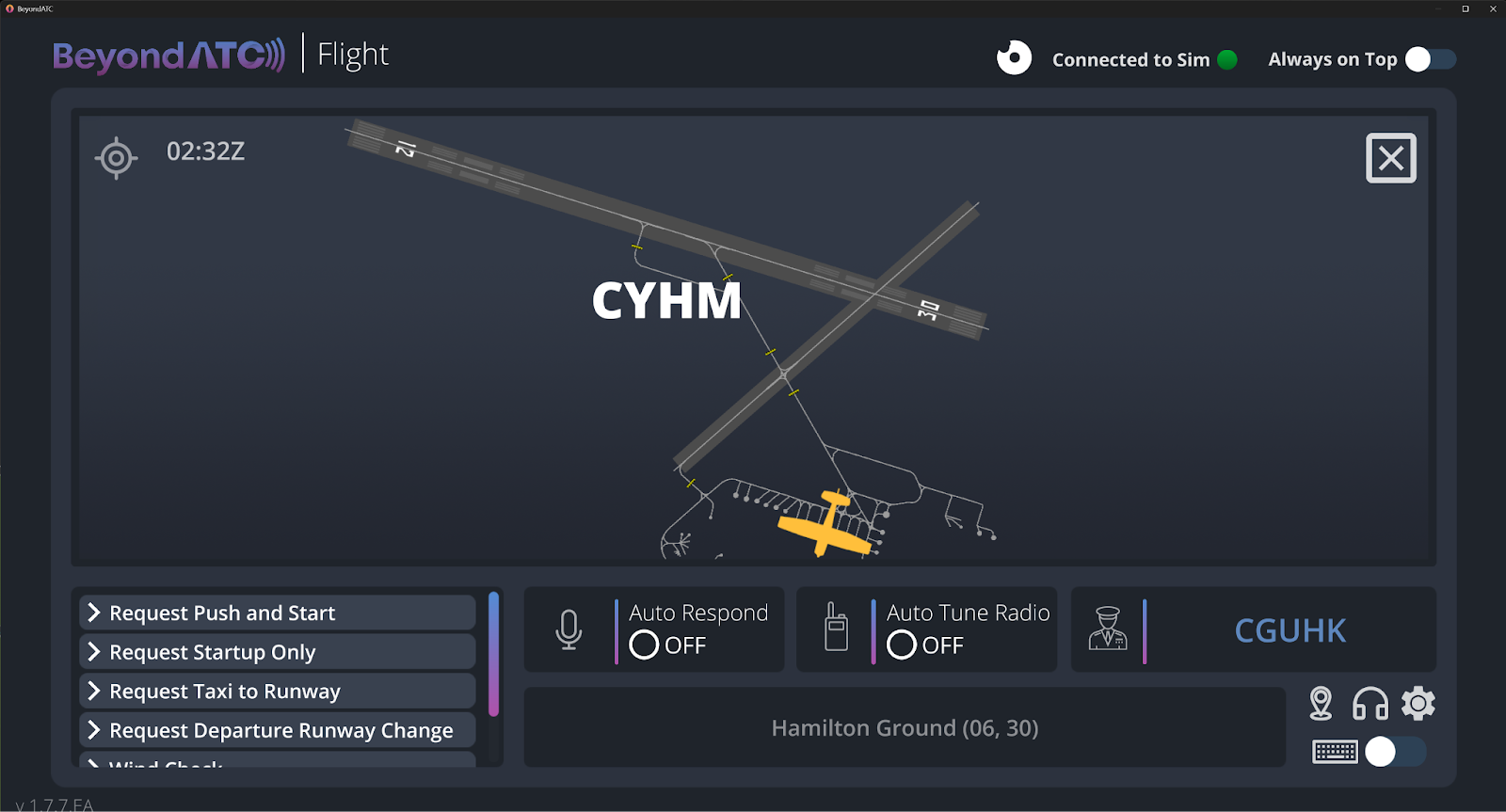
The in-flight UI for BeyondATC is honestly really well done, and it provides you with all the information you need. Starting on the ground, the application provides you with a taxi diagram, which is not something I was expecting. Also, when you receive your taxi clearance, it will display a blue line that you can simply follow to comply with the route you were given.
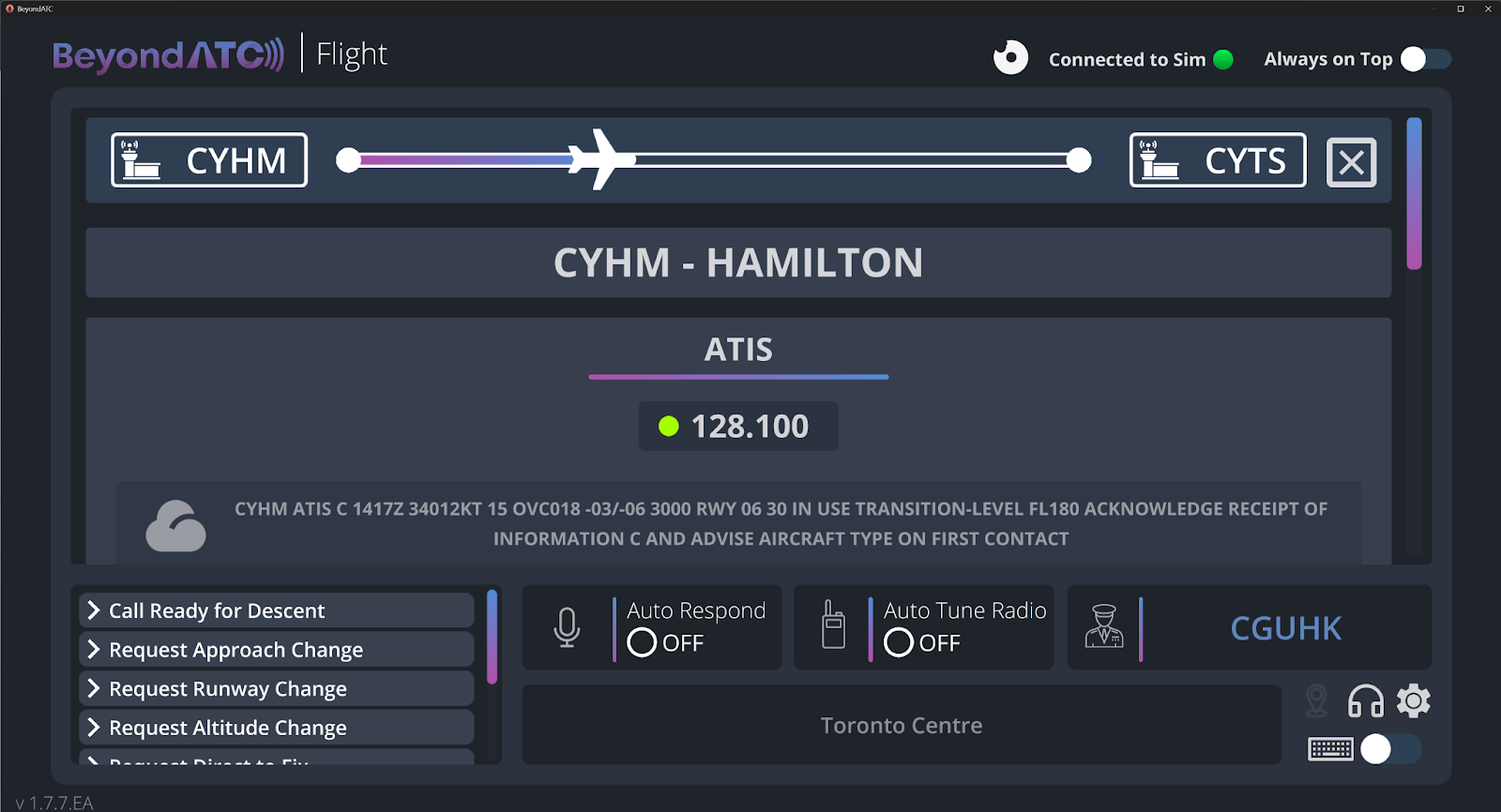
Another great inclusion is the ability to view the airport information from inside the application, which provides you with the ATIS, ground, tower, departure, and center frequencies. This page also provides you with a textual view of the ATIS, so you do not need to tune the frequency and spend time waiting for it to go over the ATIS through voice, which is a great quality of life feature.
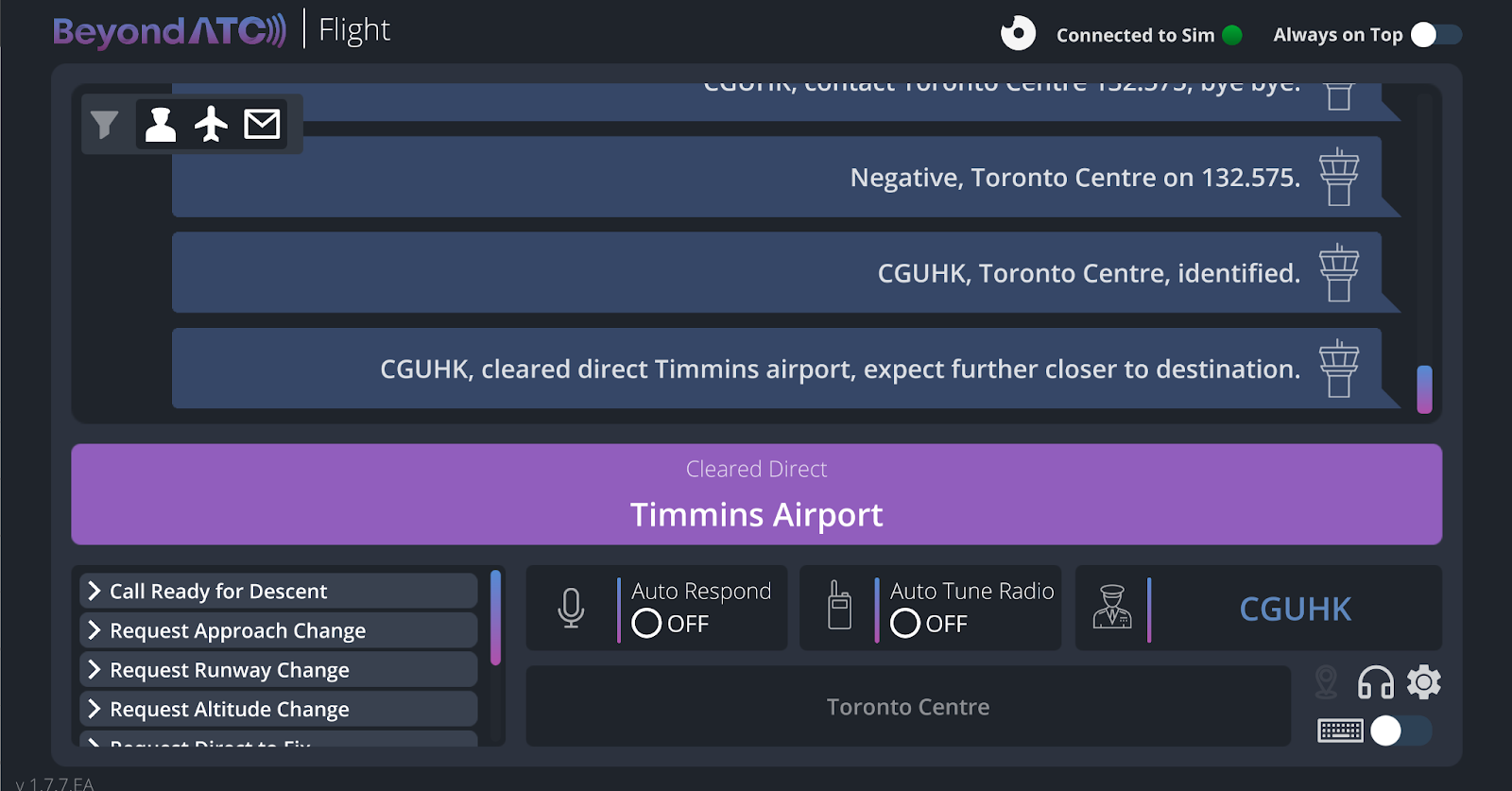
Lastly, you are able to view ATC messages, in case you are having trouble understanding or hearing them, you can simply read them. Additionally, you can type to ATC instead of talking, and you can tell the application to auto-tune the radio, and auto respond (which is great if you go away from your computer while in cruise). As well, you can see the current frequency you are on and who you are talking to, and you have the option to submit pre-selected messages such as calling ready for descent, requesting an approach change, etc.
In general, the in-flight UI is fantastic and provides you with all the information you need. Everything works flawlessly after you link your SimBrief flight plan, and all the information you need is shown to you on the screen. If I had to make one complaint, it would be that you cannot change your callsign in the application (it must be set within SimBrief), and if you want to import a new flight plan, you have to restart the application. However, besides those two points, I do not have any other issues with the UI, and it will serve you well.
VR Users
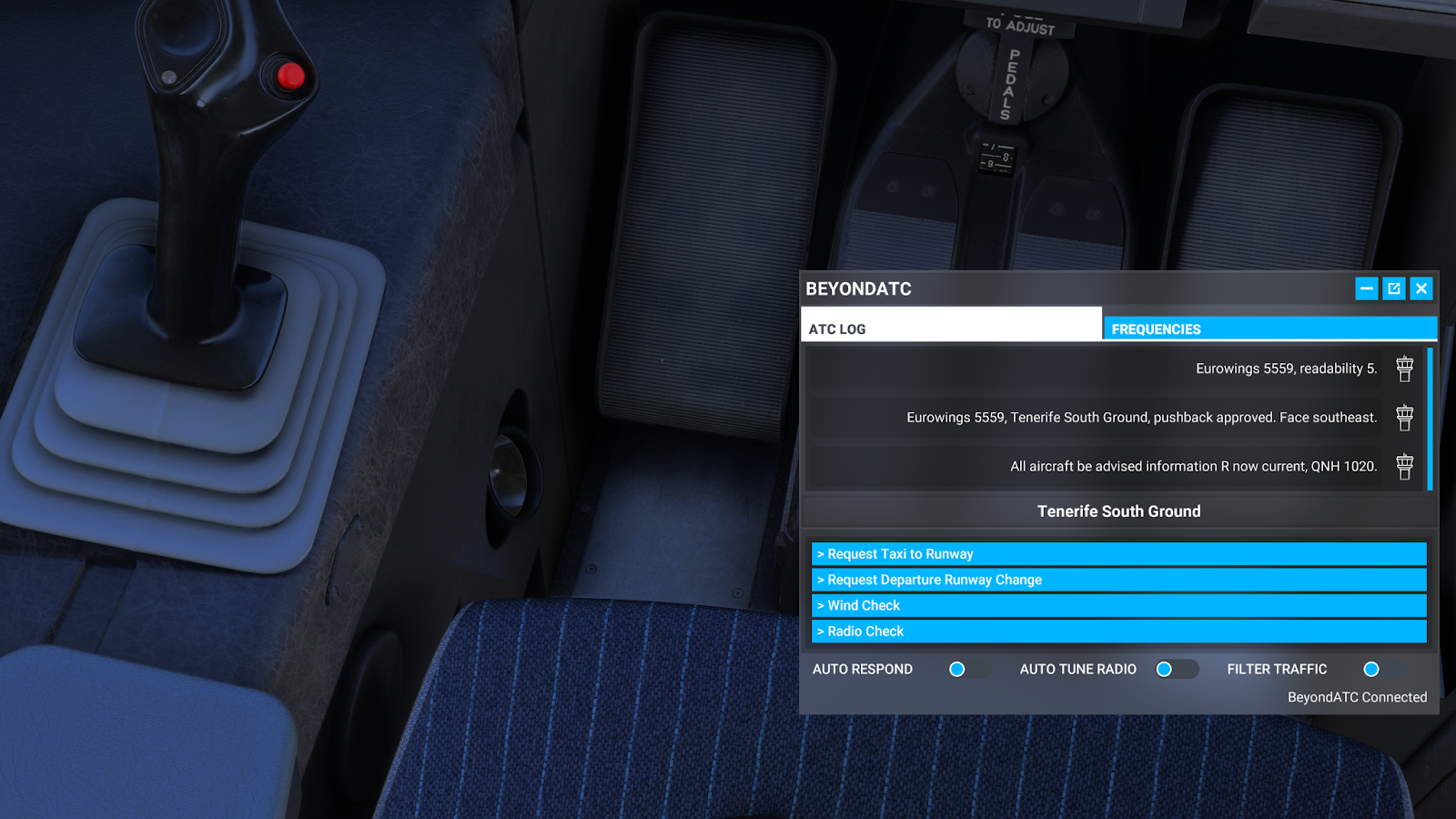
If you are a VR user you will be glad to hear that BeyondATC works with VR. Instead of using the external application, you can use an in-game panel, which is provided for download on the BeyondATC website. The UI of this panel is not as good as the actual application, however. If you are a VR user, it will get the job done, and is a much better solution than having to tab out of the sim while in VR. In the screenshot below, you can see that you are able to see the ATC log (which displays your previous messages with ATC), you have the pre-determined options you can quickly choose from such as requesting taxi, you can turn on auto response, auto tune radio, and filter traffic. Additionally, on the frequencies tab, it shows all relevant frequencies for your aircraft, which in this case, showed the relevant frequencies for Tenerife (GCTS), the airport I was departing from.
My First Flight
Getting started with BeyondATC is incredibly simple, for my first flight, I simply loaded into MSFS 2024 at CYHM, an airport in Ontario, Canada. After that, I put my SimBrief ID into the application, and clicked fly. Then, the application loaded my flight plan, and everything was connected and ready to go, which was a really nice and easy experience.
The first thing I did when starting up the aircraft was listen to the ATIS broadcast, and I was happy to see that it worked using the correct frequency. However, I noticed that the ATIS broadcast provided slightly different weather than what the airport was reporting:
METAR CYHM: 30012G20KT 15SM BKN087 M10/M14 A3009
BeyondATC ATIS: 34012 15SM OVC018 -03/-06 A3000
As we can see here, the wind data, cloud cover, temperature, and altimeter are off compared to what is being reported in the real world. According to the BeyondATC website, the application does not use real world ATIS data, instead, it makes its own ATIS using METAR weather data from aviationweather.gov, VATSIM METAR (as a fallback), and airport SOP flows (to decide runway use). This is not incorrect behaviour, as there is an option in the settings of BeyondATC to enable historical weather. If that option is enabled, it will take the real-world, historical weather for the time you had set in your simulator, to generate the ATIS. Therefore, if you want to fly using live weather, but prefer to change the time in your simulator, make sure to disable that option.
After listening to the ATIS, I requested my IFR clearance for my destination airport, Timmins (CYTS). I was incredibly impressed with how well ATC handled the IFR clearance, providing me with a departure runway, heading, altitude, and squawk code, using correct phraseology. The premium voices, although not perfect, are much more human-like than I thought they would be, and I found them to be quite immersive.
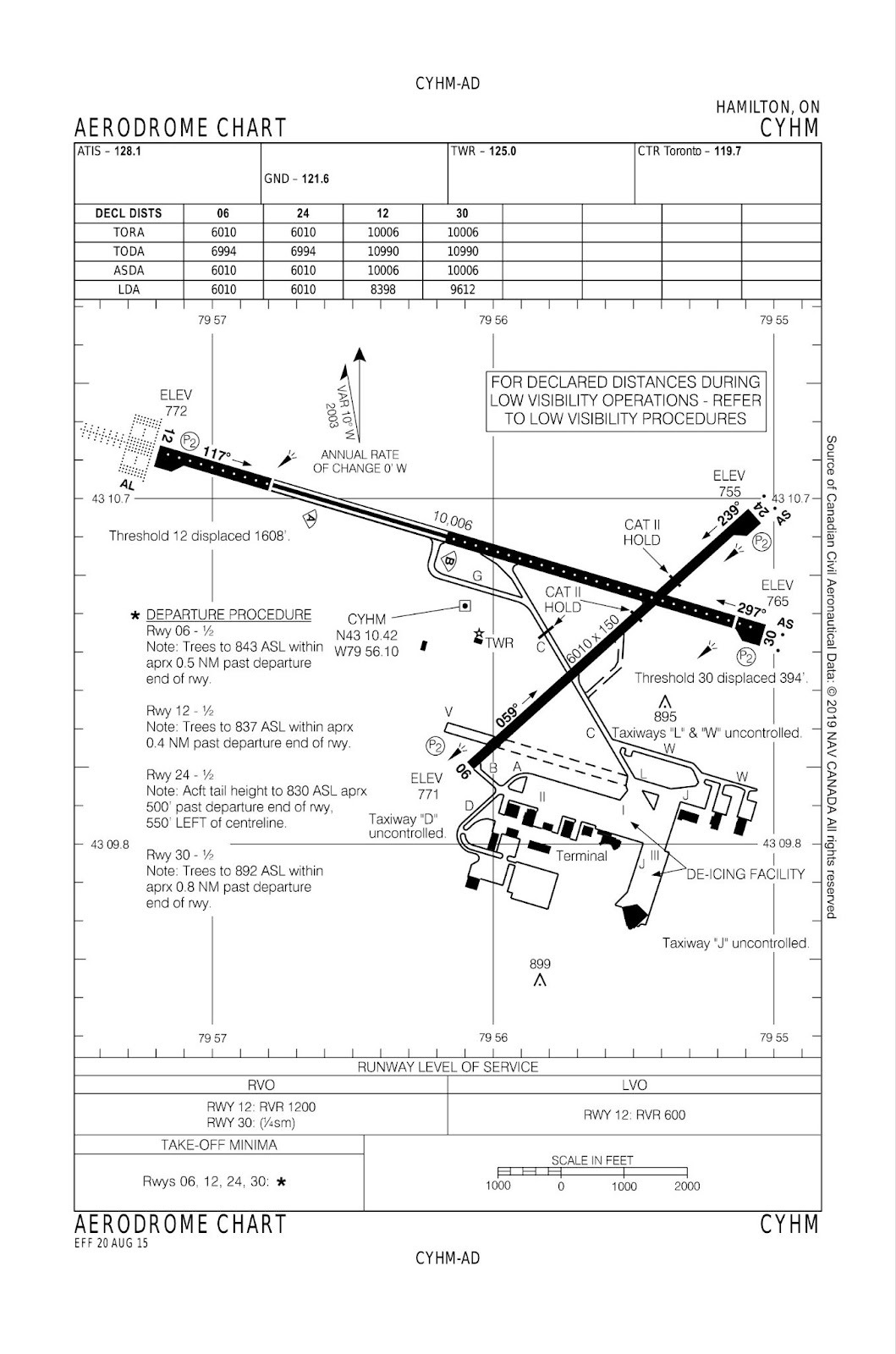
After requesting pushback, I was cleared, and correctly told to face to the northeast, which makes sense with the departure runway I chose. My next step was then to request a taxi, and this is where ATC got a little bit confused. My departure runway was Runway 30 which requires a backtrack to enter as there is no taxiway leading to the threshold. Instead of using Runway 06 as a taxi route, it wanted to send me all the way down C, to then backtrack the whole runway. This is not necessarily incorrect, as the route it chose does work, and the phraseology it used was correct. Unfortunately, it is just not what would be done in real life, as using Runway 06 as a taxiway is much more efficient, as you can see in the airport chart below. I can see why the AI would mess up here, as a lot of airports would not do it this way, but it would be great if the BeyondATC team could try to account for situations such as these.
After advising I was lined up, I was cleared for takeoff and given my heading to fly, which I did. After climbing past 3000 feet, CYHM tower automatically handed me off over to Toronto center (using the correct frequency), who then cleared me to my cruise altitude and told me to fly direct to NUBER (my next waypoint on route). This was seriously impressive as the AI understood everything I was saying, they were using correct phraseology, what they were doing was correct, and I felt like I was talking to a real controller.
Once I got to cruise, it became pretty quiet, and I was passed along the various controllers, each with a different voice. While I was in cruise, ATC actually contacted me to tell me I was off course (I forgot to add a waypoint to my flight plan), and cleared me direct to my next waypoint. There are some times when the ATC struggles, however, as when I was provided frequencies, I could not shorten them, which is sometimes what pilots do in the real world. For example, I was told to “contact Toronto center on 132.575”, and I responded with just “contact Toronto center on 32.575,” and the AI did not like that I shortened the frequency, and made me repeat. I understand why the AI would struggle with this, as it is non-standard phraseology to not repeat the full frequency, but it would be nice to see improvements for the controller to be able to detect instances such as this when the readback is still correct.
Now, the descent is where things started to get a bit wonky. I told the controller I was ready to descend, and he started giving me vectors for the ILS approach when I was still 80 miles out which was weird. On top of this, he told me to turn right to a heading of 180, but that would have reversed my course, as I was heading North. Unfortunately, ATC does not seem to like to be corrected, because when I tried telling ATC that they were wrong, they would just say readback incorrect, so they do not seem to be very flexible. After I ignored it for a little bit, it then wanted me to turn left to 300, which is a more appropriate heading, however, I was still 50 miles away, so once again, it would not make sense to be vectored so early.
Once I approached the airport, I was told there was no tower available to talk to, so I could change frequencies, however, this is only half correct. While CYTS does not have a standard tower, it does have a flight service station, who will provide you with traffic information, recommended runways to land on, weather, etc. So while there is not a tower who will clear you to land or anything, there still is somebody to talk to at the airport.
If I had to summarize my first flight with BeyondATC, it would be a fantastic departure, but not as much for the arrival. The departure portion I was thoroughly impressed with the procedures, phraseology, and overall experience, it was genuinely immersive. However, when I was on arrival, and ATC was giving me weird vectors and instructions, it did take me out of the immersion, and I had to ignore some of the instructions in order to fly the aircraft properly (UPDATE: I redid this exact flight with the new experimental update, and there were some improvements. The vectors were still weird, but they were more accurate. I was given vectors 99 miles out which was still weird, but the heading they gave me did at least make sense. However, I was also told to descend from FL400 to FL330, 200 miles away from my airport, which did not make any sense. Therefore, although the update did improve the experience a little bit, there are still some issues that you have to consider when flying).
ATC Voice Quality
The quality of the premium voices are genuinely quite good, they sometimes sound a little robotic, but for as far as AI goes, they do their job. The accents that the ATC has are super immersive, as when I was flying in Canada they had the correct accent, when I was flying in England they had an English accent, etc. Also, airlines had different accents that correctly corresponded to their region, as for example, when Aegean airlines was speaking, they sounded like they were from Greece. The only problem is the premium voices do not last so long, with only 50,000 characters being included with purchase of the product. For those who fly in busy airports, or on long IFR flights, they will find they will run out of characters pretty quickly, as the 50,000 is only an hour of speaking. Thankfully, you are able to purchase additional characters, with 250,000 costing $9.99, and 750,500 costing $29.99. It is worth noting the developer makes no profit on these sales, as the cost purely covers server expenses. The basic voices are not terrible, but they are noticeably less quality than the premium ones. However, they are not as bad as a simple text to speech voice would be, they do still contain some emotion, and do still sound a little bit human. Honestly though, they are better than I expected, and I would not find it irritating to use only the basic voices if I had to. Lastly, local voices can be used, which like the basic voices, use no cost. The advantage of using these is that they do not require an internet connection, and their response times are faster. However, the accents are currently limited to only the USA and UK, and I did find the quality to be slightly worse than the basic voices (UPDATE: After a major update, local voices now have all the same accents as the premium voices do. Although, this is only available on the experimental version for the time being).
Thankfully, the developer provided the option to be able to switch between using premium, basic, and local voices, which can be changed easily in the application. This is super helpful, because for example, I will use the premium voices for departure and arrival, but once I get to cruise, I will set the voices to basic so I do not use my premium characters. When I was getting this product, I was scared I was going to be forced into constantly purchasing the premium voices, but since the basic voices are not terrible in quality and do the job, I would be happy with only using the basic voices.
ATC Behaviour
For the most part, the ATC behaviour is quite good, and impressive, but it also has its downsides. As I noted in the first flight, ATC does have a tendency to give weird vectors and descent altitudes, even after the experimental update. On my second flight into CYHM, ATC kept on turning me left and right, telling me to turn right to 025, then left to 010, and they did that two-three times. Then, when I was turning final, ATC told me to turn left to 265, then 245, then 225 (twice), all while I was still turning. This behaviour was unrealistic, as ATC should have just told me to turn left to 225 in the first place. Secondly, 225 ended up being the wrong heading as I was not aligned with my final approach course to intercept the RNAV, so I had to manually re-vector myself. I also noticed on that flight that ATC has trouble pronouncing some words, as instead of saying “RNAV”, they would say “R-N-A-V,” pronouncing each letter separately, which is obviously not correct. However, I have also had flights where ATC performed everything from the IFR clearance to my arrival perfectly, and when ATC acts correctly, the addon becomes very enjoyable. For example, I did a flight to Miami, and ATC correctly cleared me to descend via the STAR, gave me the correct runway, cleared me for a visual approach, provided correct vectors, and also descent altitudes while being vectored. Once I was cleared for landing, I was told to vacate the runway, asked what gate I was parking at, and cleared to taxi. Another example is, there were times when I was ready for departure, but AI aircraft were landing, and ATC correctly made me hold short. Another major benefit to the ATC behaviour in BeyondATC is the fact that not only does it use the correct real world frequencies, but who you are talking to actually makes sense. What I mean by this is, I have used other AI ATC applications before, and sometimes you would hear an aircraft requesting clearance on center frequency, or requesting to taxi on centre frequency, which took me out of the immersion. In BeyondATC, all calls will be made to the correct frequency, and you will never have a situation such as the aforementioned one, which increases immersion exponentially. Unfortunately, there are some times when ATC will just not understand you, especially when you shorten the readback. Just as I noted in the first flight, if you do not readback the full frequency, the ATC may not understand you. Another instance is when I was given vectors, such as “turn right heading 250,” and I simply read back “right 250,” ATC did not accept this response and made me read it back again.
It is hard to talk about every single scenario, but there were various times where ATC impressed me on what it was doing, making it feel like I was talking to an actual human. Not every flight is going to go perfectly, however, and you do need to be careful of what ATC is instructing you to do. Nevertheless, I believe that when most people begin using BeyondATC, they will be impressed by the behaviour of ATC, as long as you keep in mind that it is not perfect and is prone to issues here and there.
CPDLC (Early Access Feature)
CPDLC is implemented in BeyondATC, but it is an early access feature, so bugs may occur. If you are not aware of what CPDLC is, it stands for “Controller Pilot Data Link Communications”. In essence, this is a way for controllers to 'text' you information instead of relaying the data through voice, which will save time for both the controllers and pilots, and helps with decongesting the radio frequency when it is busy. It includes altitude, route, and speed suggestions, frequency changes, and pilot requests (directs, climbs/descents, etc). ACARS is also implemented, which allows the pilots to receive pre-departure clearances, request METARs, TAFs, etc.
Not all aircraft are compatible with BeyondATC’s CPDLC/ACARS, as it is up to addon developers to implement it in their aircraft. Currently, the developers that support this are the Fenix A319/20/21, the FlyByWire A320, FSLabs A320, iniBuilds A340/A350, Headwind A330, and the Leonardo MD-82/83/88. Some default aircraft are supported via mods on flightsim.to, which include the Asobo Citation Longitude, Asobo Daher TBM, Liv2Air CJ3+, and the Asobo Cirrus Vision Jet in MSFS 2024.
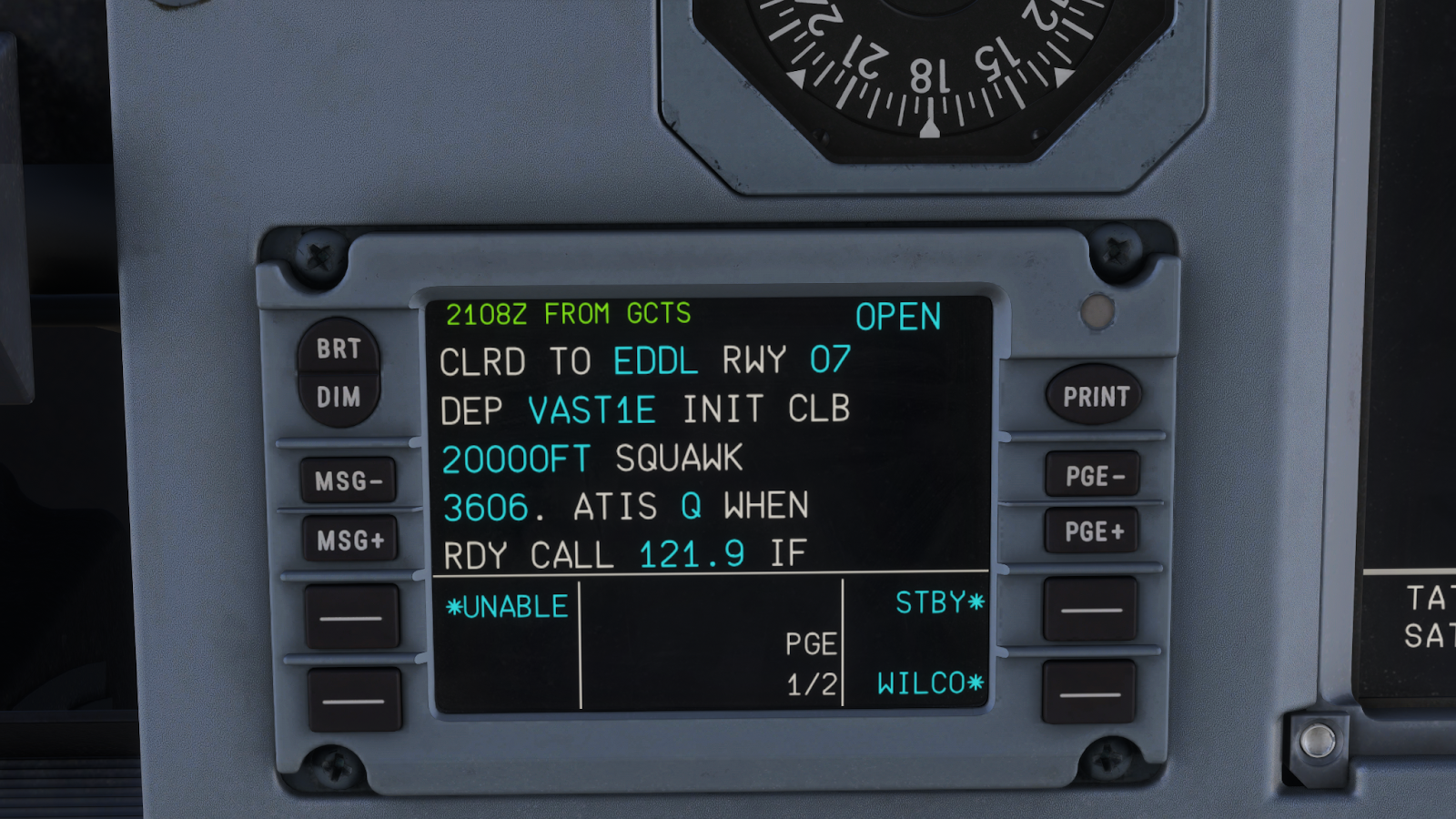
To provide an example of the CPDLC, I will run you through a flight I did using the Fenix A320. Firstly, I requested my pre-departure clearance using the MCDU, where I had to fill out my arrival/departure, ATIS ID, station ID, aircraft, type, and callsign. After putting in all this information, I sent it, and then received my pre-departure clearance from ATC, which I accepted.
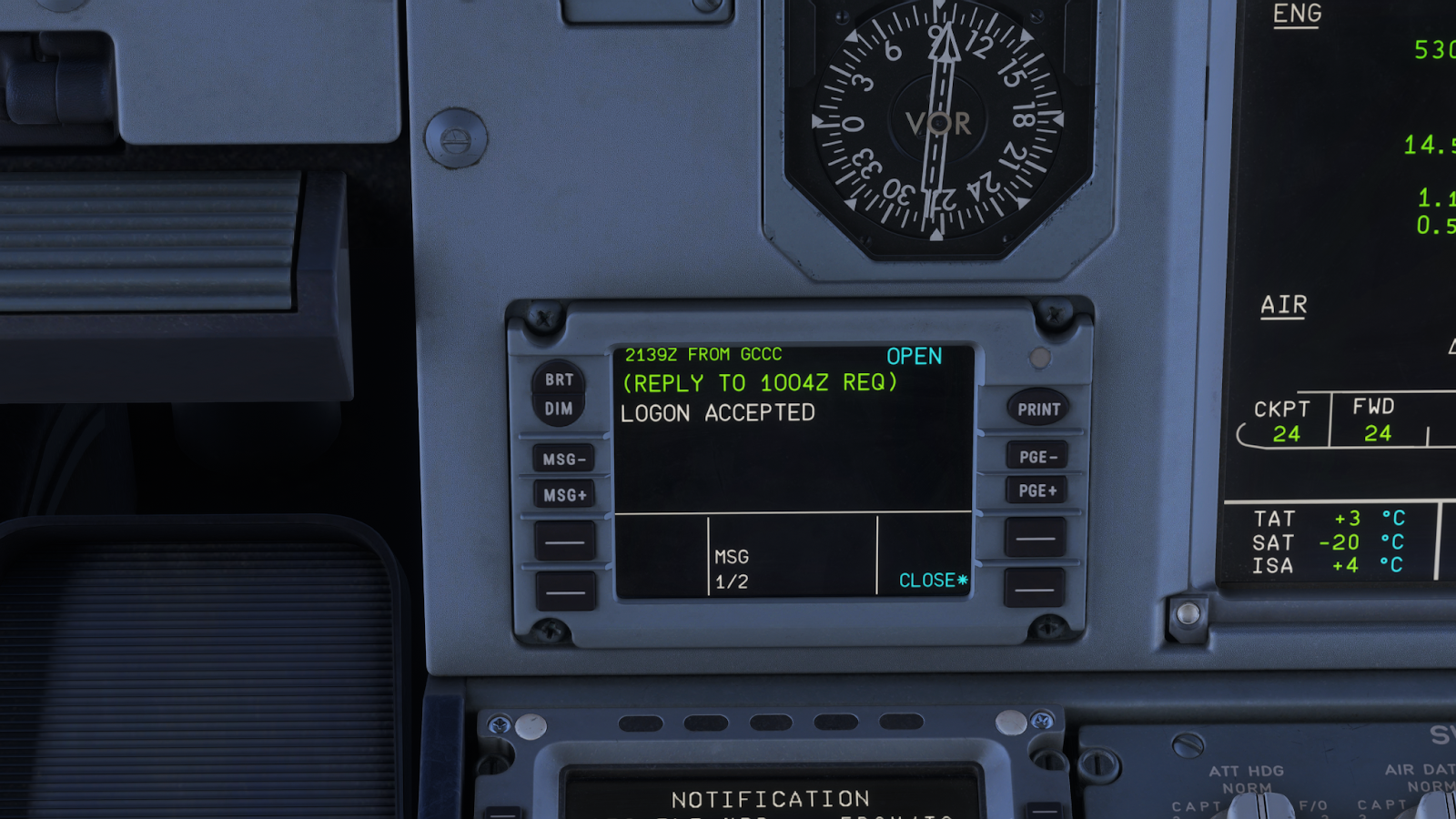
Once I got to cruise I was able to connect to the center controller through the ID given to you in the BeyondATC application. From there, I could request direct to waypoints, changes in speed, or altitude. For this example, I requested direct to a waypoint, which worked incredibly well. In this instance, ATC denied my request, which is not unrealistic.
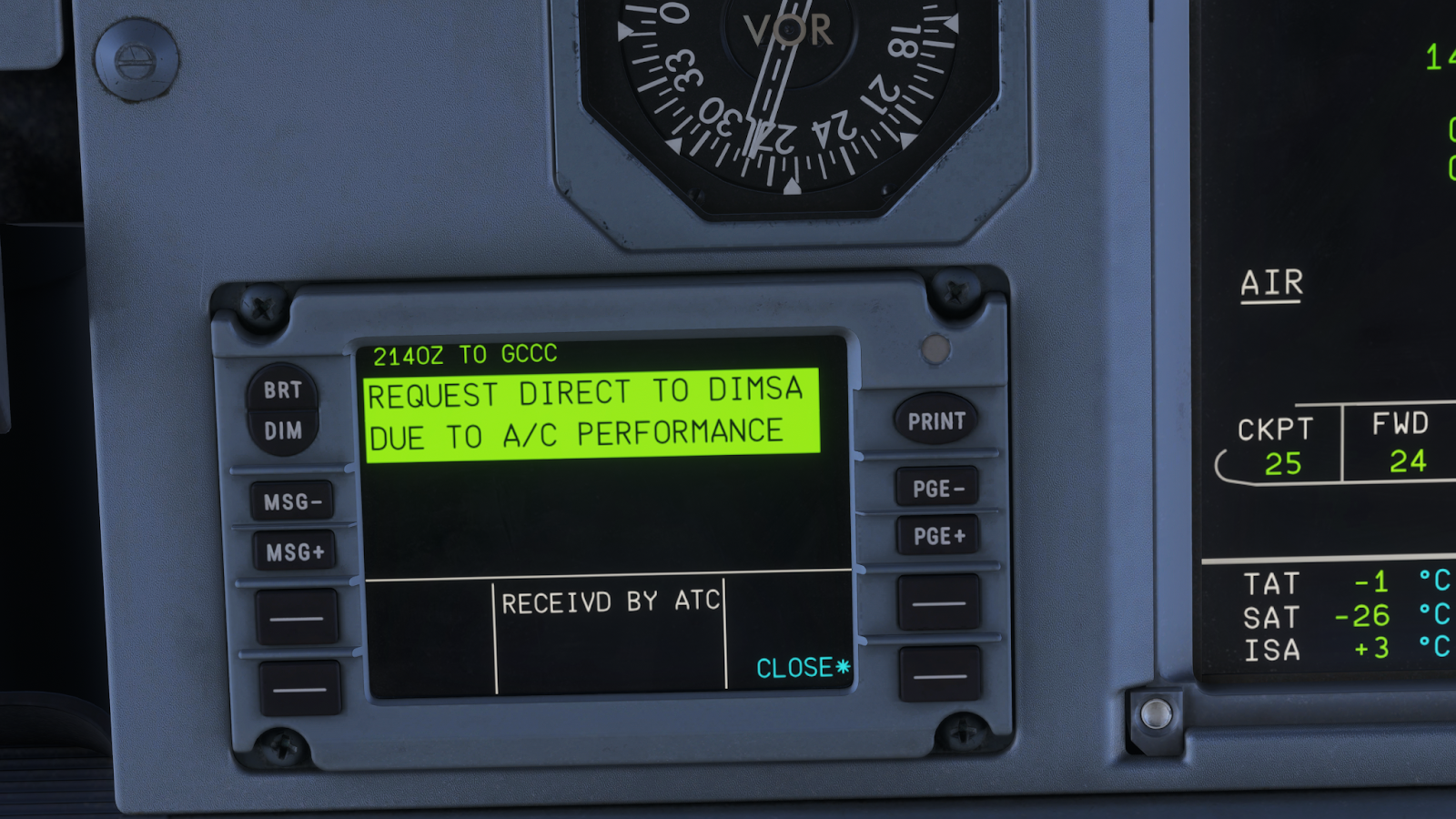

The CPDLC integration is genuinely one of my favourite parts of BeyondATC, as CPDLC/ACARS is something that is used extensively in the real world, it was great to be able to use it in the sim, and it is something that I will be using a lot more in the future. Even though it is an early access feature, I had a great time using, and did not notice any major issues.
AI Traffic
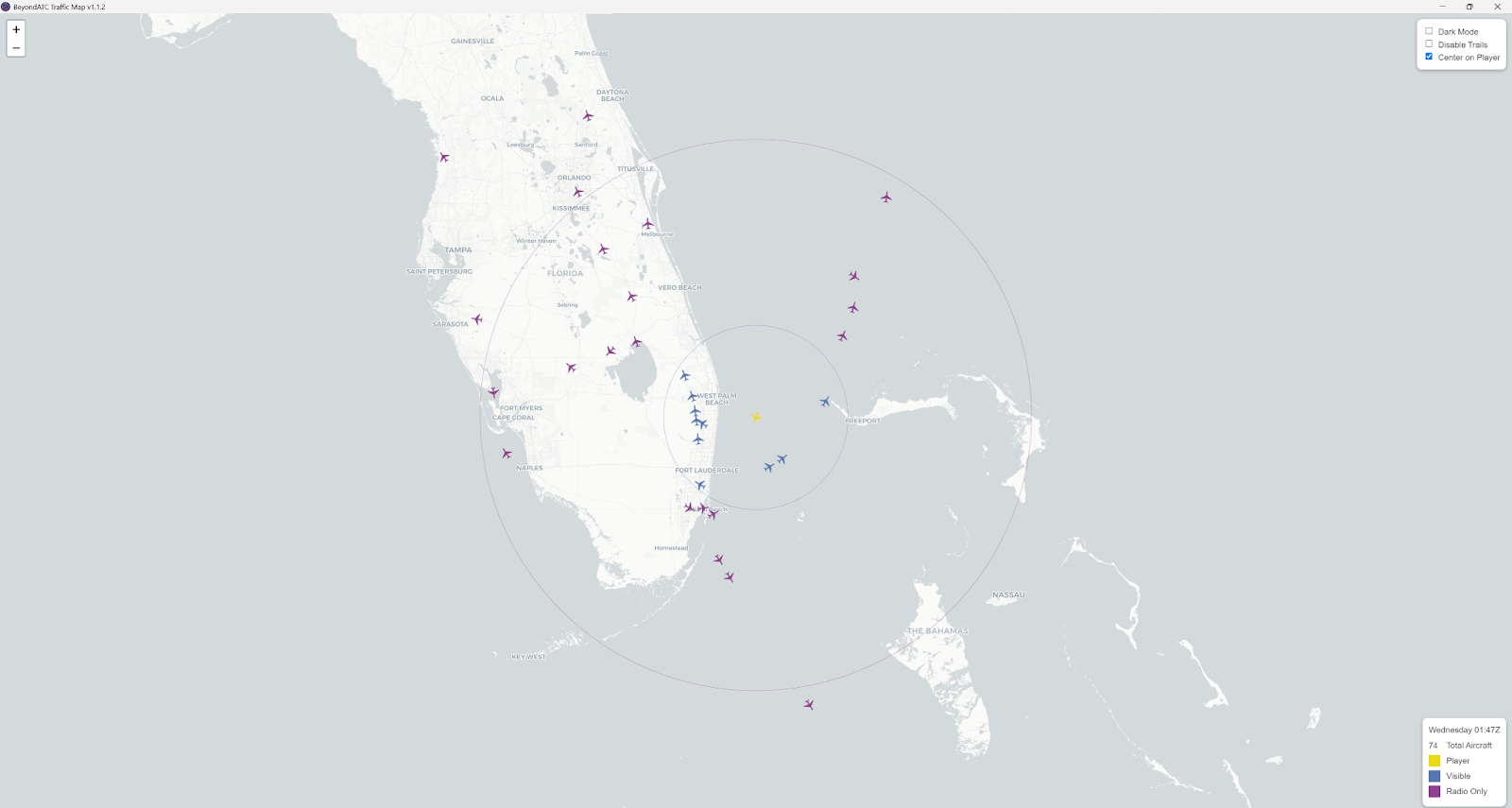
BeyondATC gives you the option to use AI traffic that can be visible using third party model matching. For this review, I used FSLTL, which provides free high quality models, and I recommend trying them out. If you are not a fan of FSLTL, or already use other traffic models, both AIG and FSTraffic work with BeyondATC. By having all this traffic around you, including hearing them on the radio throughout all phases of flight, it seriously increases immersion, and is one of my favourite aspects of BeyondATC. With the AI traffic though, it can become resource intensive, especially at larger airports. Thankfully, the developer provided the option to change the density of parked, departure, arrival, and enroute traffic, so you can fine tune the settings to your liking. As well, the traffic you see at airports will be accurate, as they use real world historical route data, to ensure you are not getting any weird airlines, such as seeing Ryanair in Miami. There are currently some downsides, however, as the AI traffic is still in its alpha phase. Although I did not have any major issues with my time testing, there are some limitations to the implementation of the traffic. Firstly, AI traffic lacks separation handling, so they cannot be given dynamic speed adjustments for separation from your aircraft. Secondly, AI traffic cannot currently fly holding patterns or go-arounds, which could become a problem in certain scenarios. The developer has noted that these features are expected to come in the future, though it is worth noting that there are some limitations at the moment. Lastly, an application is included for download with your purchase, where you can see the AI traffic on an interactive map. Although this is not really required for flying, it is neat to see all the aircraft around you, and where they are going, and I enjoy that the developer included this.
Performance
I did not notice any significant performance impacts with BeyondATC. When running AI traffic with FSLTL, I did have some decrease in performance, but that is to be expected, due to the numerous models being injected into the simulator. I do not imagine most users would notice any significant performance impact running BeyondATC with their sim. The main problem would be the AI traffic injection, but that is not necessarily the fault of BeyondATC, and performance may vary depending on the method of injection you are using (FSLTL, AIG, FSTraffic).
What is Missing?
As an early access product, BeyondATC does not have everything implemented yet, so if you do not want to buy the product due to missing features, that is understandable. What is currently missing is VFR (which looks likely to release very soon), so if you are someone who does not fly IFR, then BeyondATC is not the product for you. Furthermore, emergency procedures are unfortunately not implemented yet, so you cannot simulate any emergencies in flight. As well, oceanic procedures do not work, so for those of you who like to do a lot of long hauls, that is something to consider. The developer has said that all these features are planned to come in the future, however, as with any product, it is understandable to wait until these features actually release if you consider them essential.
Final Thoughts
With its well done UI, high quality premium voices, AI traffic, and quality ATC implementation, I have thoroughly enjoyed testing BeyondATC through the various flights I have done with it. When flying using the plugin, you have to understand that the ATC is not perfect, and it will make mistakes, and you sometimes have to be on top of your flying to ensure that you do not follow any weird instructions. If you are willing to ignore these issues, then BeyondATC is a genuinely impressive product. When the ATC works, and it provides you with adequate instructions, it is super immersive, and a great addition to the simulator. At $29.99 for the basic package, it is worth the money, and if you purchase it, you will have an enjoyable time. Since BeyondATC is still an early access product, I am incredibly excited for where the future of the addon will go, especially as more features such as VFR, emergency procedures, and oceanic procedures are implemented. If you wish to purchase BeyondATC, you can do so on their website, and I believe you will have an enjoyable experience, as it is my preferred AI ATC add-on out of the other options on the market.
Share this page



COMMENT ADVISORY:
Threshold encourages informed discussion and debate - though this can only happen if all commenters remain civil when voicing their opinions.